Preface#
The next important thing that I built for the project is a shared SPI driver to communicate with the W5500 Ethernet controller and the microSD card. Both devices use SPI for communication, but they have different requirements, such as clock speeds and chip-select pins. Instead of using separate SPI peripherals for each device, I decided to use a single SPI bus shared between them.
Since the project uses FreeRTOS, different tasks may need to access these devices, so we also need a way to ensure that only one device uses the SPI bus at a time.
I already explored SPI communication in the bare-metal article, including a simple MOSI-MISO loopback test and using the SPIM peripheral with EasyDMA. This driver builds on that work by adding support for multiple devices, bus locking, and device-specific configurations.
GitHub Repo: https://github.com/codetit4n/nrf52840-webserver
Design Goals#
Here are the goals I had in mind:
- Support multiple SPI devices sharing the same bus, each with its own configuration.
- Use a FreeRTOS mutex to prevent multiple tasks from accessing the bus simultaneously.
- Support multiple transfers within a single transaction while keeping the selected device’s chip-select asserted.
- Keep transfers blocking for now, with timeouts and proper handling of EasyDMA’s RAM-buffer requirements.
Hardware Setup and Wiring#
For the shared SPI bus, I am using the following hardware:
- W5500 Lite Ethernet Module — Provides Ethernet connectivity. Powered by 3.3 V.
- MicroSD Card Reader Module — Used to interface with the microSD card over SPI. Powered by 5 V.
- MicroSD Card — Stores the website files.
- Breadboard and jumper wires — For connecting the components.
- Breadboard Power Supply Module — Provides 3.3 V and 5 V power rails.
The W5500 and SD card reader share the same SPI bus (SCK, MOSI, and MISO), but each has its own chip-select (CS) pin. Both modules share a common ground.
Here is the complete wiring diagram:
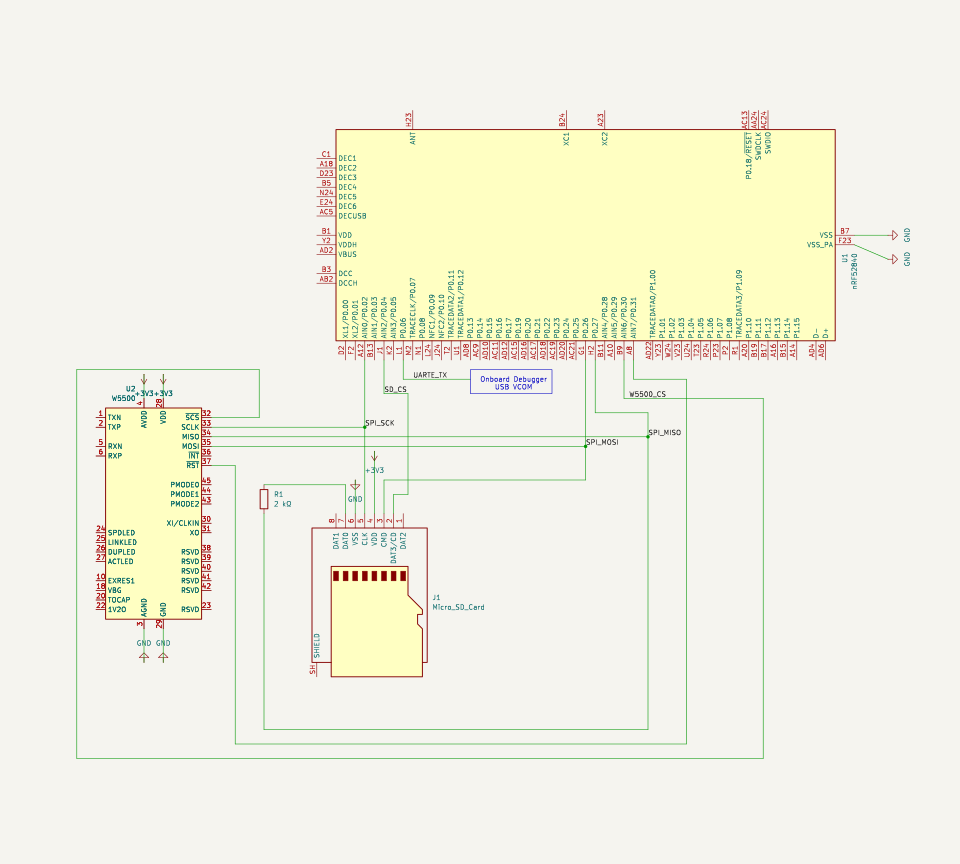
Architecture#
Both the W5500 and the SD card need SPI communication. Rather than using multiple SPIM peripherals or separate wiring for SCK, MOSI, and MISO, I am using a shared SPI architecture. The shared driver communicates with the nRF52840’s SPIM0 peripheral, which handles SPI communication with both the microSD card and the W5500 Ethernet controller.

Serial Peripheral Interface Master (SPIM) Driver#
Relevant Source Code#
- Board Config Header - include/board.h
- Driver Header - include/drivers/spi.h
- Driver Source - src/drivers/spi.c
Registers#
Registers for configuration, tasks, and events needed to operate the peripheral are declared in board.h:
#include "nrf52840.h"

#define SPIM NRF_SPIM0
#define SPIM_CONFIG_REG (SPIM->CONFIG)
#define SPIM_FREQUENCY_REG (SPIM->FREQUENCY)
#define SPIM_ENABLE_REG (SPIM->ENABLE)
#define SPIM_EVENTS_END_REG (SPIM->EVENTS_END)
#define SPIM_EVENTS_STARTED_REG (SPIM->EVENTS_STARTED)
#define SPIM_EVENTS_STOPPED_REG (SPIM->EVENTS_STOPPED)
#define SPIM_ORC_REG (SPIM->ORC)
#define SPIM_TXD_PTR_REG (SPIM->TXD.PTR)
#define SPIM_TXD_MAXCNT_REG (SPIM->TXD.MAXCNT)
#define SPIM_RXD_PTR_REG (SPIM->RXD.PTR)
#define SPIM_RXD_MAXCNT_REG (SPIM->RXD.MAXCNT)
#define SPIM_TASKS_START_REG (SPIM->TASKS_START)
#define SPIM_TASKS_STOP_REG (SPIM->TASKS_STOP)
#define SPIM_SHORTS_REG (SPIM->SHORTS)
#define SPIM_INTENCLR_REG (SPIM->INTENCLR)

#define SPIM_PSEL_SCK_REG (SPIM->PSEL.SCK)
#define SPIM_PSEL_MOSI_REG (SPIM->PSEL.MOSI)
#define SPIM_PSEL_MISO_REG (SPIM->PSEL.MISO)

// GPIO pins for the shared SPI bus
#define SCK_PIN 2 // P0.02
#define MOSI_PIN 26 // P0.26
#define MISO_PIN 27 // P0.27

// CSN Pins for the two devices
#define W5500_CSN_PIN 30 // P0.30
#define SD_CSN_PIN 4 // P0.04
NOTE: The register definitions are included from nrf52840.h. That is the only use of the included nrf52840.h file in the source code.
I am using a single SPIM peripheral for the project (SPIM0). That is why we have common SCK, MOSI, and MISO pins,
but separate chip-select pins (CSN) for the W5500 and SD card.
Similar to UARTE, the SPIM peripheral uses EasyDMA to transfer data between RAM and the SPI peripheral without the CPU having to move each byte manually. So, all we need to do is configure the relevant registers, provide the transmit and receive buffers, and trigger the transfer. EasyDMA handles moving the data while the SPIM peripheral handles the actual SPI communication.
Configuring the Peripheral#
The spim_init() function is used to initialize the SPIM0 peripheral. This function is called when the device is turned on to bring up the hardware.
GPIO Configuration for the shared
SCK,MOSI, andMISOpins:/* ---------------- SCK pin ---------------- */ SPIM_PSEL_SCK_REG = (0 << 31) | // CONNECT = 0 → Connected (0 << 5) | // PORT = 0 → P0 (SCK_PIN << 0); GPIO_CNF(SCK_PIN) = (1 << 0) | // DIR = Output (1 << 1) | // INPUT = Disconnect (0 << 2) | // No pull (0 << 8) | // Standard drive (0 << 16); // No senseDatasheet Reference
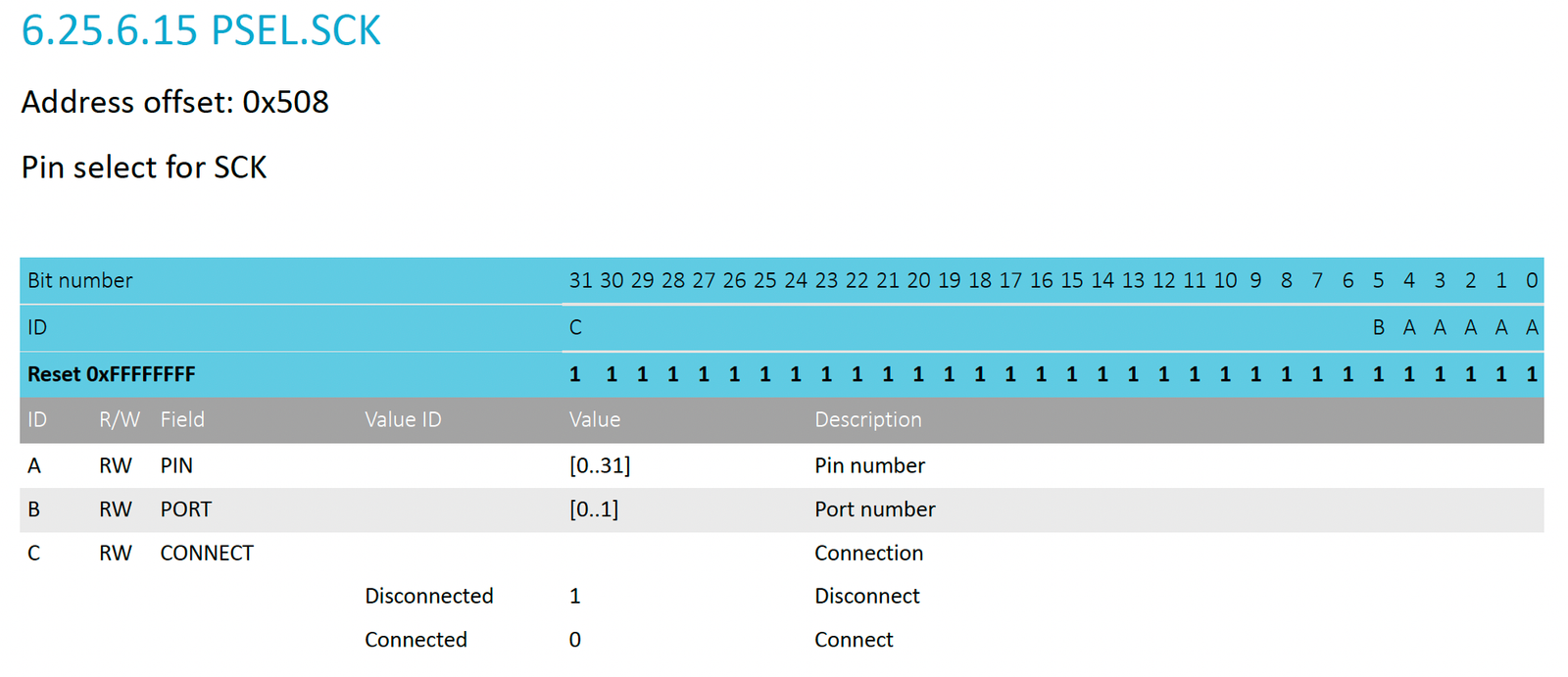
![Datasheet Reference PIN_CNF[0]](../datasheet-pin-cnf0.png)
/* ---------------- MOSI pin ---------------- */
SPIM_PSEL_MOSI_REG = (0 << 31) | (0 << 5) | (MOSI_PIN << 0);

GPIO_CNF(MOSI_PIN) = (1 << 0) | // Output
		     (1 << 1) | // Disconnect input
		     (0 << 2) | (0 << 8) | (0 << 16);
Datasheet Reference
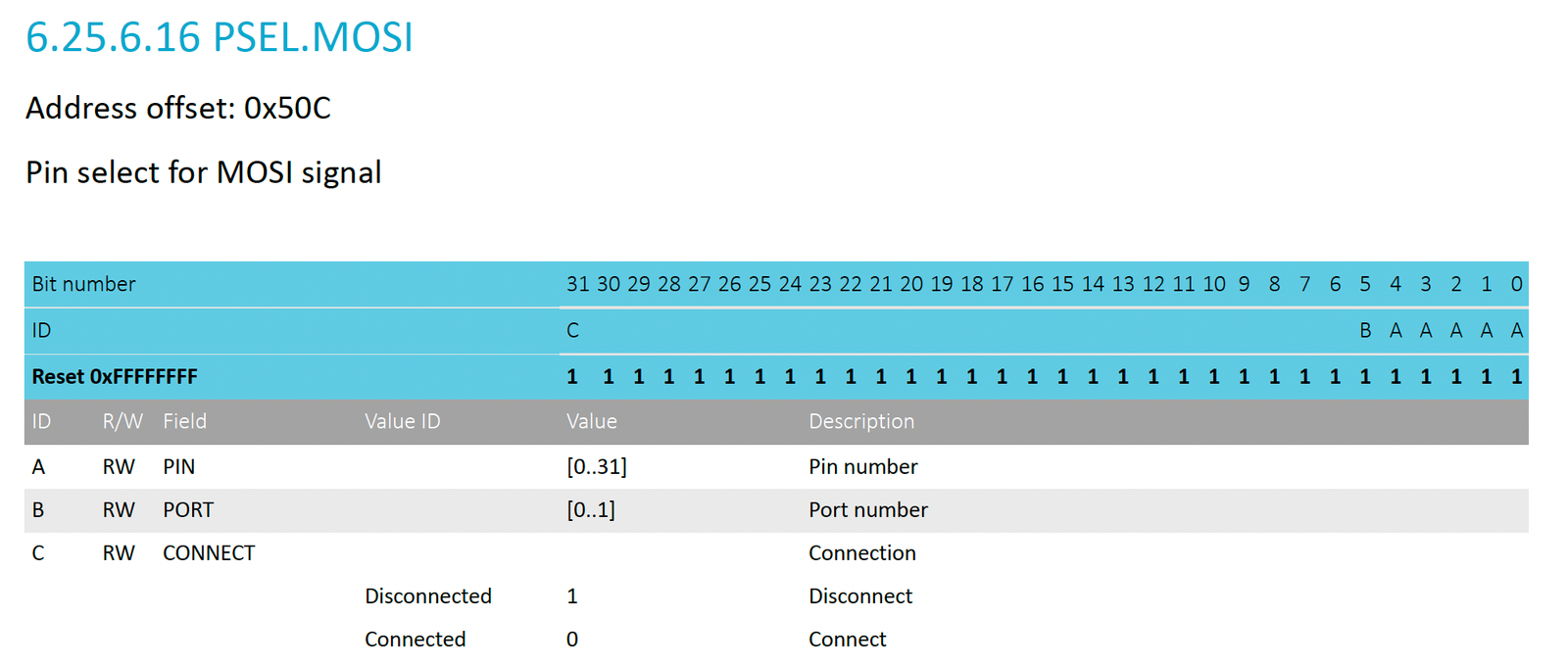
/* ---------------- MISO pin ---------------- */
SPIM_PSEL_MISO_REG = (0 << 31) | (0 << 5) | (MISO_PIN << 0);

GPIO_CNF(MISO_PIN) = (0 << 0) | // DIR = Input
		     (0 << 1) | // INPUT = Connected
		     (0 << 2) | // No pull (depends on slave)
		     (0 << 8) | (0 << 16);
Datasheet Reference
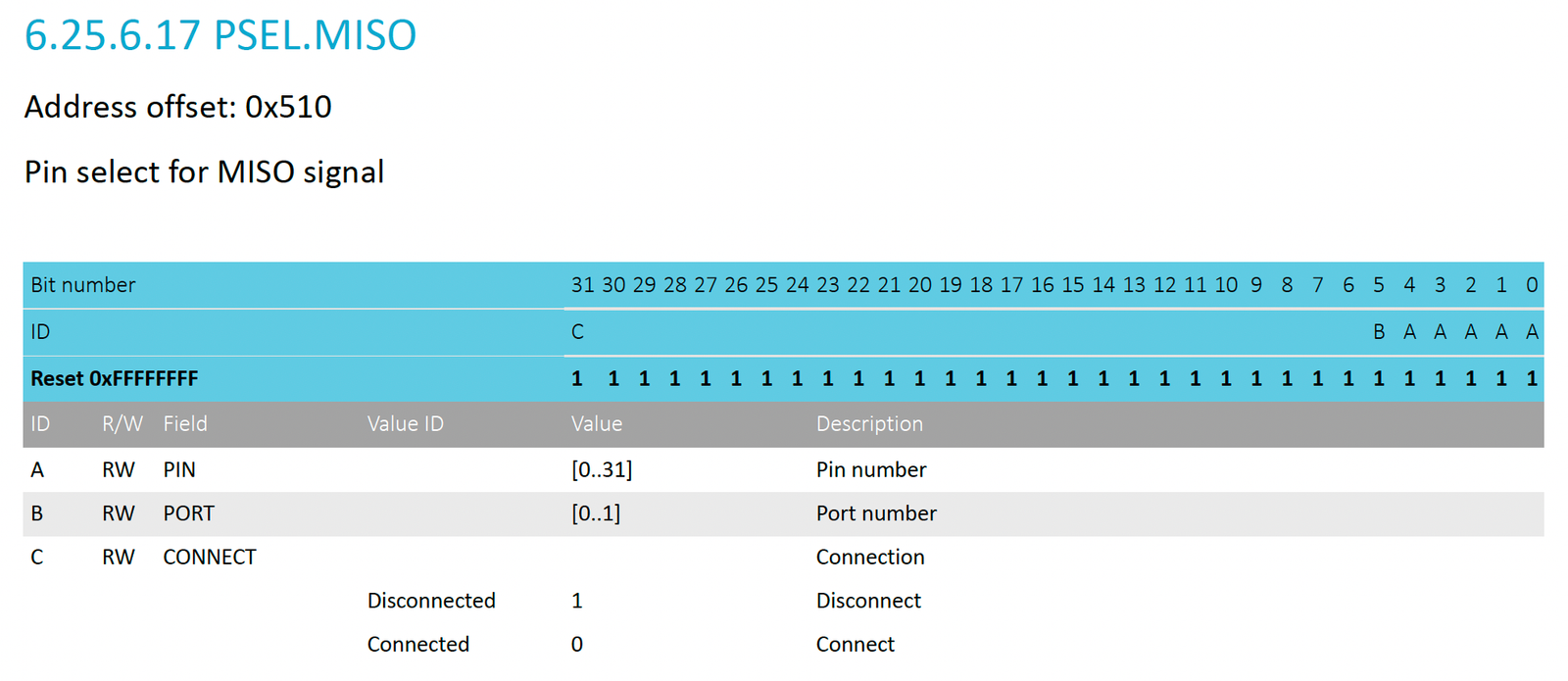
SPIM0 Peripheral Configuration:
SPIM_CONFIG_REG = (0 << 0) |	 // CPHA = 0
		  (0 << 1) |	 // CPOL = 0
		  (0 << 2);	 // ORDER = 0 → MSB first
SPIM_FREQUENCY_REG = 0x10000000; // 1 MHz
SPIM_ORC_REG = 0xFF;
// ... setting other registers to good defaults
SPIM_INTENCLR_REG = 0xFFFFFFFF; // Disable all interrupts
SPIM_ENABLE_REG = 7; // Enable the SPIM peripheral
NOTE:
INTENCLRdisables all SPIM interrupts, since the driver uses polling instead.Datasheet Reference
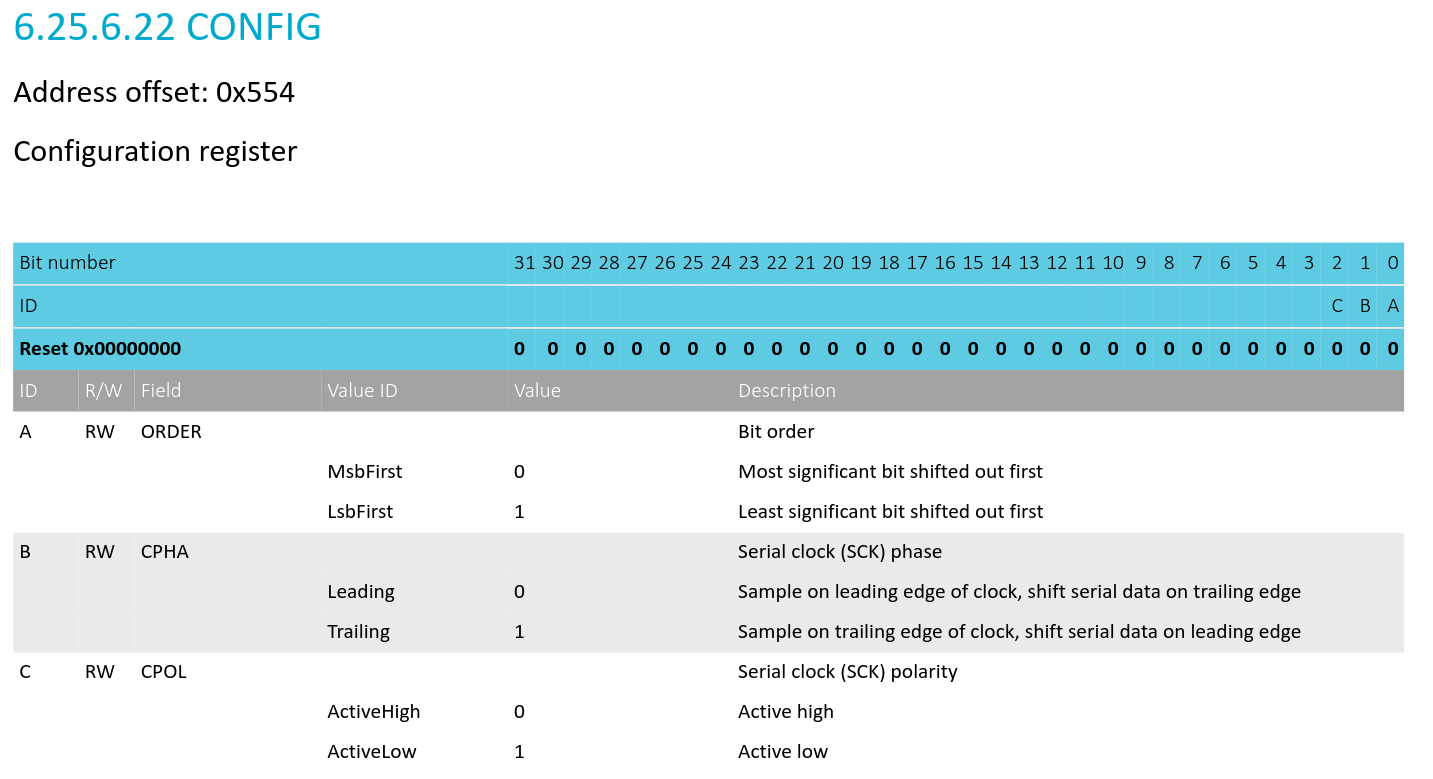
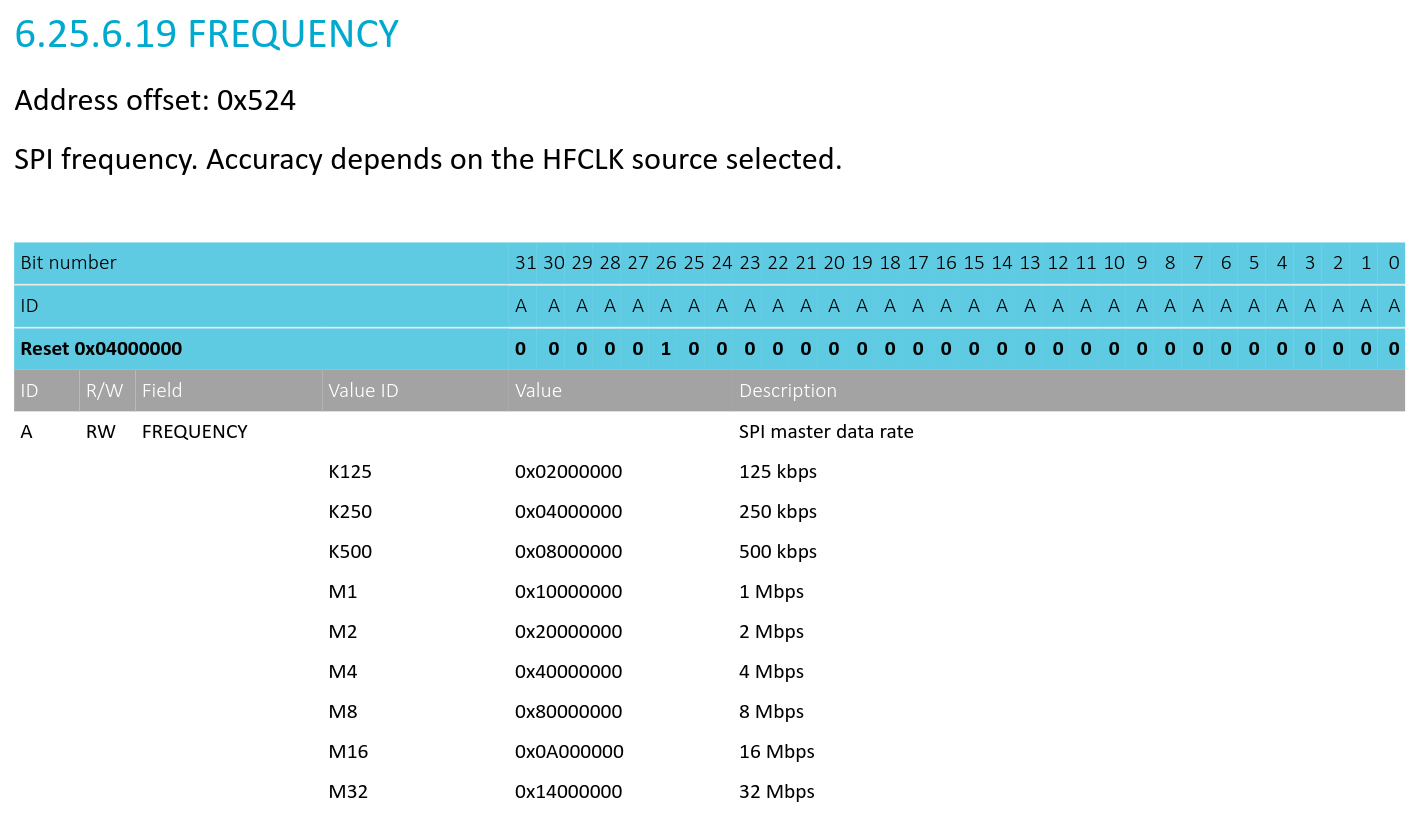
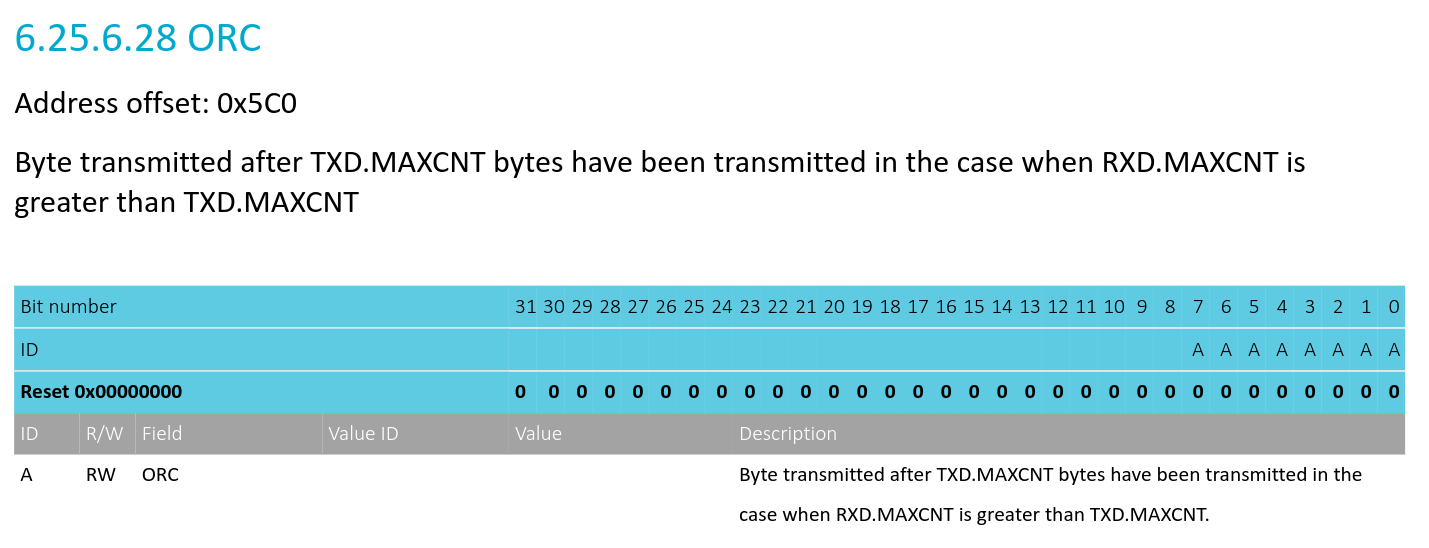
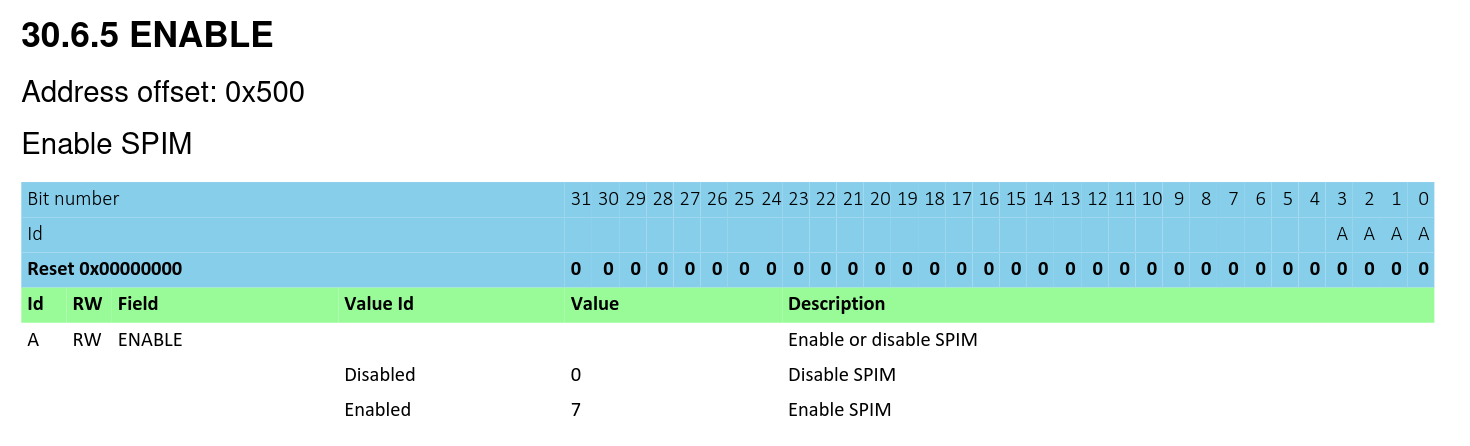
These are the default settings for the SPIM peripheral. The clock speed, configuration, and ORC register values can be changed later when a specific device is selected for communication — these are just the default values. The
ORCregister is used to send a default value when the master is reading from the slave and the slave has no data to send.Create a mutex to guard exclusive access to the SPIM0 peripheral:
static SemaphoreHandle_t spi_bus_mutex = NULL;
StaticSemaphore_t spi_bus_mutex_buf;
// ...
spi_bus_mutex = xSemaphoreCreateMutexStatic(&spi_bus_mutex_buf);
This prevents multiple tasks from accessing the SPI bus at the same time, avoiding potential data corruption or unexpected behavior.
Setting Up SPI Devices#
The Device Struct#
Each SPI device has its own instance of the spi_device_t struct:
typedef struct {
	uint32_t cs_pin; // The CSN pin for the device
	spi_mode_t mode; // SPI mode (0-3)
	spi_frequency_t frequency; // SPI clock frequency
	spi_bit_order_t order; // Bit order (MSB or LSB first)
	uint8_t dummy_byte; // Dummy byte to send when reading from the device
} spi_device_t;
So, for example, the W5500 device is configured as follows:
static const spi_device_t w5500_dev = {
    .cs_pin = W5500_CSN_PIN, // Chip-select pin for the W5500
	.mode = SPI_MODE_0, // CPOL = 0, CPHA = 0
	.frequency = SPI_FREQ_16M, // Using 16 MHz for the W5500
	.order = SPI_MSB_FIRST, // MSB first
	.dummy_byte = 0xFF
};
Device Initialization#
The spi_device_init() function
takes a pointer to an already configured spi_device_t struct and initializes the device’s chip-select GPIO pin. It
configures the pin as an output and sets it HIGH (inactive) by default.
void spi_device_init(const spi_device_t* dev) {
    // Set CS high before configuring the pin as an output
    pin_high(dev->cs_pin);

    GPIO_CNF(dev->cs_pin) = (1 << 0) | // DIR = Output
                           (1 << 1) | // INPUT = Disconnect
                           (0 << 2) | // PULL = Disabled
                           (0 << 8) | // Standard drive
                           (0 << 16); // SENSE = Disabled

    pin_high(dev->cs_pin);
}
Datasheet Reference
NOTE: Setting the pin HIGH before configuring it as an output helps avoid a brief LOW pulse on CS, which could accidentally select the device during initialization.
Starting and Ending SPI Transactions#
Before starting any SPI transaction, we need to call the spi_begin() function,
passing the configuration of the device we want to communicate with. The function acquires the bus mutex, configures
the SPIM peripheral for the selected device, and asserts its chip-select pin.
int spi_begin(const spi_device_t* dev) {
    // take the mutex to ensure exclusive access to the SPI bus
    BaseType_t ok = xSemaphoreTake(spi_bus_mutex, portMAX_DELAY);
    // ... some checks and error handling if the mutex is not acquired

    // update the SPIM peripheral configuration registers for the selected device
    SPIM_CONFIG_REG = // ... configure the mode and bit order based on dev->mode and dev->order
    SPIM_FREQUENCY_REG = dev->frequency;
    SPIM_ORC_REG = dev->dummy_byte;

    // ... clear events etc
    pin_low(dev->cs_pin); // assert the CS pin enabling communication with the device
    active_dev = dev; // store the active device for later use
}
NOTE: The
active_devvariable keeps track of the currently selected device. It is used byspi_end()to deassert the correct chip-select pin and by the transfer functions to access device-specific settings, such as the dummy byte.
The mutex remains locked and the selected device’s chip-select stays asserted throughout the transaction. This allows multiple SPI transfers without another task interfering with the bus.
After completing the transfers, we need to call the spi_end() function
to deassert the chip-select pin and release the bus mutex, allowing other tasks to use the SPI bus.
int spi_end(void) {
    pin_high(active_dev->cs_pin); // deassert the CS pin
    active_dev = NULL; // clear the active device
    xSemaphoreGive(spi_bus_mutex); // release the mutex
}
Performing SPI Transfers#
The driver API provides three functions for performing SPI transfers:
spi_tx()function (Transmit only): This function sends data to the selected device without reading any response.spi_rx()function (Receive only): This function reads data from the selected device while sending the dummy byte defined in the device configuration.spi_txrx()function (Transmit and receive simultaneously): This function sends data to the selected device while reading its response.
For this version, I am using blocking SPI transfers to keep the implementation simple. I have also defined SPI_MAX_XFER
as 512 bytes to keep individual transfers small and bounded. Larger transfers can be split into smaller chunks, with each
chunk completing before the next one starts.
Handling EasyDMA Buffers#
The nRF52840’s SPIM EasyDMA requires both TX and RX buffers to reside in Data RAM, as EasyDMA cannot directly access flash memory or other non-RAM regions.
This can be a problem when transmitting data stored in flash, such as constant arrays. To handle this, I added a small helper function that checks whether the entire buffer lies within the RAM address range before passing it to EasyDMA.
extern uint8_t __ram_start__;
extern uint8_t __ram_end__;

static uint8_t check_buf_in_ram(const uint8_t* buf, size_t len) {
    uintptr_t ram_lo = (uintptr_t)&__ram_start__;
    uintptr_t ram_hi = (uintptr_t)&__ram_end__;

    uintptr_t p = (uintptr_t)buf;
    uintptr_t q = p + len;

    // ... NULL and overflow checks

    // check if the buffer is fully within RAM
    return (p >= ram_lo && q <= ram_hi) ? 1 : 0; // [ram_lo, ram_hi)
}
NOTE: The addresses of the RAM region (i.e.,
__ram_start__and__ram_end__) are obtained from the linker script.
I have defined two static buffers to handle SPI transfers using EasyDMA:
#define SPI_MAX_XFER 512
static uint8_t scratch_buf[SPI_MAX_XFER];
static uint8_t tx_staging_buf[SPI_MAX_XFER];
NOTE:
SPI_MAX_XFERis set to 512 bytes, which is a reasonable size for most SPI transfers. It can be adjusted if needed.
scratch_buf— Used to discard incoming data during TX-only transfers and send dummy bytes during RX-only transfers.tx_staging_buf— Used to temporarily hold TX data when the original buffer is not in RAM.
Executing a Transfer#
The spi_tx(), spi_rx(), and spi_txrx() functions perform the actual SPI transfers. All three work roughly the same way, with
a few differences:
- Validate and prepare buffers.
- Configure EasyDMA.
- Start the transfer.
- Wait for completion.
Since the driver uses blocking transfers, the calling task waits until the transfer completes. This is fine for now because we are only performing short bursts of SPI communication. For longer transfers, we could use interrupts to avoid continuously polling for completion. EasyDMA already handles moving the data.
Transmit Only - spi_tx()
int spi_tx(const uint8_t* tx_buf, size_t tx_len) {
    // ... validations and event clearing

    // Use the original buffer if it is in RAM
    if (!check_buf_in_ram(tx_buf, tx_len)) {
        mem_cpy(tx_staging_buf, tx_buf, tx_len);
        tx_buf = tx_staging_buf;
    }

    SPIM_TXD_PTR_REG = (uintptr_t)tx_buf;
    SPIM_TXD_MAXCNT_REG = tx_len;

    // Discard received data
    SPIM_RXD_PTR_REG = (uintptr_t)scratch_buf;
    SPIM_RXD_MAXCNT_REG = tx_len;

    // Start the transfer
    SPIM_TASKS_START_REG = 1;

    // Wait for completion (with timeout)
    while (SPIM_EVENTS_END_REG == 0) {
        // ... timeout check
    }

    // ... timeout handling and recovery
    return 0;
}
NOTE: The functions such as
mem_cpy()are defined in memutils.c.
The TX buffer is passed directly to EasyDMA if it resides in RAM; otherwise, its contents are copied into tx_staging_buf. Since
SPI is full-duplex, incoming data is received into scratch_buf and discarded.
The transfer starts by triggering TASKS_START, and the driver polls EVENTS_END to detect completion. If the transfer takes
too long, the timeout handling stops the operation and returns an error.
Receive Only - spi_rx()
int spi_rx(uint8_t* rx_buf, size_t rx_len) {
    // ... validations and event clearing

    // RX buffer must reside in RAM
    if (!check_buf_in_ram(rx_buf, rx_len)) {
        return -1;
    }

    // Fill scratch buffer with dummy bytes
    for (size_t i = 0; i < rx_len; i++) {
        scratch_buf[i] = active_dev->dummy_byte;
    }

    // Transmit dummy bytes to generate clock pulses
    SPIM_TXD_PTR_REG = (uintptr_t)scratch_buf;
    SPIM_TXD_MAXCNT_REG = rx_len;

    // Store incoming data in the RX buffer
    SPIM_RXD_PTR_REG = (uintptr_t)rx_buf;
    SPIM_RXD_MAXCNT_REG = rx_len;

    // Start the transfer
    SPIM_TASKS_START_REG = 1;

    // Wait for completion (with timeout)
    while (SPIM_EVENTS_END_REG == 0) {
        // ... timeout check
    }

    // ... timeout handling and recovery
    return 0;
}
Since SPI is full-duplex, the master must transmit bytes to generate clock pulses even when it only wants to receive data.
Here, scratch_buf is filled with the selected device’s dummy byte and transmitted through MOSI, while the incoming bytes
are stored in rx_buf through EasyDMA.
Unlike spi_tx(), the receive buffer must already reside in RAM, or the function returns an error.
Transmit and Receive - spi_txrx()
int spi_txrx(const uint8_t* tx_buf, uint8_t* rx_buf, size_t len) {
    // ... validations and event clearing

    // RX buffer must reside in RAM
    if (!check_buf_in_ram(rx_buf, len)) {
        return -1;
    }

    // Use the original TX buffer if it is in RAM
    if (!check_buf_in_ram(tx_buf, len)) {
        mem_cpy(tx_staging_buf, tx_buf, len);
        tx_buf = tx_staging_buf;
    }

    // Configure EasyDMA TX
    SPIM_TXD_PTR_REG = (uintptr_t)tx_buf;
    SPIM_TXD_MAXCNT_REG = len;

    // Configure EasyDMA RX
    SPIM_RXD_PTR_REG = (uintptr_t)rx_buf;
    SPIM_RXD_MAXCNT_REG = len;

    // Start the transfer
    SPIM_TASKS_START_REG = 1;

    // Wait for completion (with timeout)
    while (SPIM_EVENTS_END_REG == 0) {
        // ... timeout check
    }

    // ... timeout handling and recovery
    return 0;
}
Unlike spi_tx() and spi_rx(), this function uses both the TX and RX buffers to exchange data simultaneously. The
TX buffer is copied into tx_staging_buf if it isn’t in RAM, while the RX buffer must already reside in RAM. EasyDMA
then handles transmitting and receiving the bytes during the same SPI transfer.
Transfer Timeouts and Cleanup#
Why do we need a timeout?
This is a polling-based implementation, so we need a timeout. Otherwise, the task could remain blocked indefinitely if the transfer never completes.
#define SPI_TIMEOUT_TICKS pdMS_TO_TICKS(50)The timeout is set to 50 milliseconds, which is sufficient for the short SPI transfers used in this project.
Implementation:
The timeout is implemented in the transfer functions (
spi_tx(),spi_rx(), andspi_txrx()) by checking the elapsed time since the transfer started. If the transfer does not complete within the specified timeout, the driver attempts to stop it, clears the relevant events, logs an error, and returns-1.The timeout handling follows two stages: first, we wait for the transfer to complete (50 ms). If that times out, we request the peripheral to stop and wait another 5 ms for confirmation.
Timeout Handling Flow
Start SPI transfer
        |
        v
Wait for EVENTS_END (max 50 ms)
        |
        +---- Completed ----> Success
        |
        +---- Timeout
                |
                v
         Trigger TASKS_STOP
                |
                v
      Wait for EVENTS_STOPPED
            (max 5 ms)
                |
                +---- Stopped ----> Continue cleanup
                |
                +---- Timeout ----> Continue cleanup anyway
                                        |
                                        v
                              Clear events, log error
                                  and return -1
So, roughly, the timeout handling looks like this:
// Get the tick count at the start of the transfer
TickType_t start_tick = xTaskGetTickCount();

// Wait up to 50 ms for the SPI transfer to complete
while (SPIM_EVENTS_END_REG == 0 &&
       (xTaskGetTickCount() - start_tick) < SPI_TIMEOUT_TICKS) {
    vTaskDelay(0);
}

// If the transfer timed out, request the peripheral to stop
if (SPIM_EVENTS_END_REG == 0) {
    SPIM_TASKS_STOP_REG = 1;

    // TASKS_STOP requests a stop, but it may not happen immediately.
    // Wait up to 5 ms for EVENTS_STOPPED to confirm the stop.
    TickType_t stop_start = xTaskGetTickCount();

    while (SPIM_EVENTS_STOPPED_REG == 0 &&
           (xTaskGetTickCount() - stop_start) < pdMS_TO_TICKS(5)) {
        vTaskDelay(1);
    }

    // Continue cleanup even if the stop confirmation times out
    // ... clear the events and log the timeout error
    return -1;
}
NOTE: This is basic timeout handling and cleanup, not a complete recovery mechanism. The caller must still call
spi_end()to release the bus mutex and deassert the chip-select pin, even if a transfer fails.
Using the SPI Driver#
Now that we have the SPI driver ready, let’s see how it is used in the project. For this, I’ll use the microSD card driver as an example.
The SD card driver uses our SPI API
to send commands and receive data from the card. For example, the sd_read_block()
function reads a 512-byte block using CMD17, performing multiple SPI transfers within a single transaction.
Here is a simplified version of the process, with the SPI calls from the internal helper functions shown directly:
sd_status_t sd_read_block(uint32_t block, uint8_t* buffer) {
    // ... validations and CMD17 command construction

    uint8_t r1 = 0xFF;

    // sd_begin_cmd(): Begin transaction and send CMD17
    if (spi_begin(&sd_dev) != 0)
        return SD_ERR_SPI;

    if (spi_tx(cmd17, sizeof(cmd17)) != 0) {
        spi_end();
        return SD_ERR_SPI;
    }

    // Read the command response (R1)
    // ... poll using spi_rx(&r1, 1) and validate response

    // sd_wait_token(): Wait for the data token (0xFE)
    // ... repeatedly call spi_rx(&token, 1)

    // Read the 512-byte data block
    if (spi_rx(buffer, SD_BLOCK_LEN) != 0) {
        spi_end();
        return SD_ERR_SPI;
    }

    // Read the two CRC bytes
    uint8_t crc[2];
    if (spi_rx(crc, sizeof(crc)) != 0) {
        spi_end();
        return SD_ERR_SPI;
    }

    // sd_end_cmd(): End the transaction
    spi_end();

    return SD_OK;
}
In the actual implementation, sd_begin_cmd() handles starting the SPI transaction, sending the command, and receiving
its response. The transaction remains open while sd_wait_token() waits for the data token and spi_rx() reads the
block data and CRC bytes.
Finally, sd_end_cmd() closes the transaction using spi_end(), releasing the bus mutex and deasserting the SD card’s
chip-select pin.
The important thing here is that the chip-select remains asserted and the SPI bus stays locked throughout all these transfers. Another task can only acquire the bus after the transaction ends.
NOTE: This example combines the logic from multiple SD driver functions to demonstrate the SPI API. It omits some error handling and the extra idle clocks sent after ending the transaction. The complete SD card driver will be explained in a separate article. Stay tuned for that!
That’s pretty much it for the shared SPI driver. However, while working with the W5500 and microSD card reader on the same SPI bus, I ran into an interesting hardware issue, which I will explain in the next section.
The SD Card Reader MISO Issue#
This issue is specific to certain SD card reader modules and is not something everyone will encounter. So, if your SD card reader is working fine on a shared SPI bus, you can skip this section.
Ideally, an SPI device should release the MISO line when its chip-select (CS) is inactive, allowing other devices to use the shared bus. However, some SD card reader modules use a 74LVC125A tri-state buffer with its output-enable (OE) pin permanently enabled.
The chip itself supports disabling its outputs, but some modules don’t use this feature correctly. As a result, the module’s MISO output remains active even when CS is inactive. This causes bus contention, where multiple devices try to drive the same MISO line simultaneously.
You can also find a discussion about this issue in the Arduino forum, where users report similar problems when using SD card readers with other SPI devices. Here is a thread.
To work around this issue, I added a 2 kΩ series resistor between the SD card reader’s MISO output and the shared MISO line. The resistor limits the current when both devices try to drive the line, reducing the interference from the SD card reader when the W5500 is communicating.
This allowed me to use both devices on the shared SPI bus. However, this is only a temporary workaround, not a proper fix for the underlying issue. You can see the resistor in the wiring diagram above.
A more permanent fix would be to modify the SD card reader module by disconnecting the 74LVC125A buffer’s output-enable (OE) input for MISO from its existing connection and wiring it to the SD card’s CS line. This would allow the buffer to release MISO (high impedance) when CS is HIGH and enable its output when CS is LOW.
The following schematic illustrates this modification:
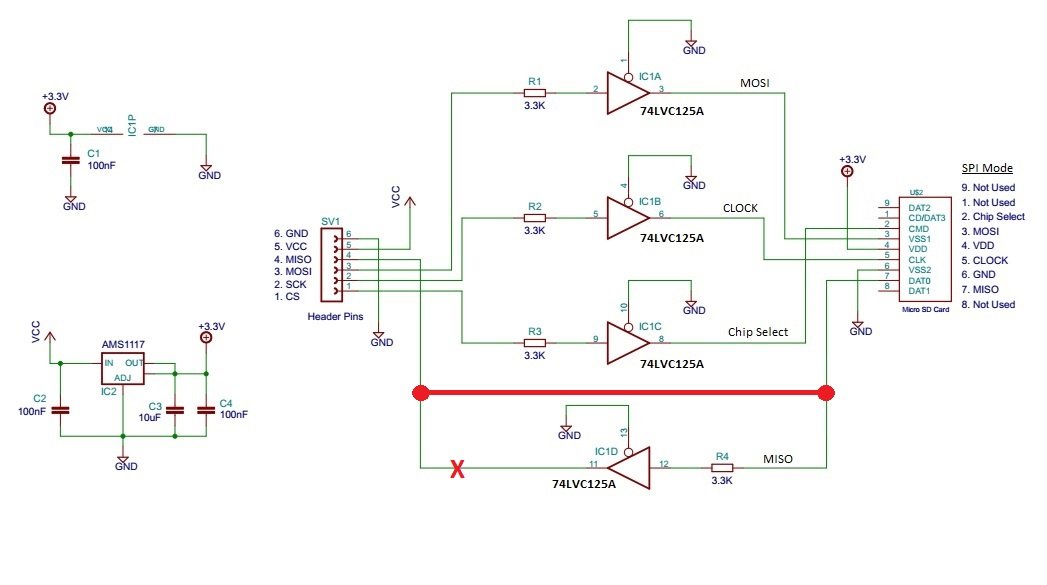
Schematic shared by @ShermanP on the Arduino Forum.
I might revisit this issue in the future and explore a more robust solution, but for now, the series resistor works well enough for the project.