Brief history of UNIX#
- UNIX was created in 1969, by the great Dennis Ritchie and Ken Thompson at Bell Labs.
- The first Unix which was widely used was the Sixth Edition, more commonly called V6.
- University of California at Berkeley used to release UNIX distributions called
BSD(Berkeley Software Distribution). Today, thanks to BSD license we have FreeBSD,
NetBSD, OpenBSD, etc. BSDs contributed things like
vi,csh, virtual memory, TCP/IP, and much more. - Then many server and other hardware companies released their own versions of UNIX, which were based on AT&T or Berkeley release for specific hardware.
Characteristics of UNIX#
- UNIX is simple. Other Operating Systems at the time had 1000s of system calls, BSD had 100s with a basic design.
- Everything is a file(except few things like sockets). So, we can do manipulation of
data and devices using a set of core system calls:
open(),read(),write(),lseek(), andclose(). - Written in C.
- Fast process creation time using unique
fork()system call. - Provided simple yet robust interprocess communication(IPC) primitives.
Linux#
- Linus Torvalds developed the first version of Linux in 1991 as an OS for computers powered by Intel 80386 microprocessors.
- Linus used to use Minix - a low-cost mini-UNIX, with not a very permissive license.
- So, he decided to write his own OS kernel, which was free and open source.
- Fast forward to today, it can run on almost every architecture, from tiny embedded devices to supercomputers.
- Linux is like UNIX, but not UNIX. That is, although Linux borrows many ideas from UNIX, and implements the Unix API(as defined by POSIX and the Single UNIX Specification), it is not a direct descendant of the Unix source code.
- Linux is a collaborative and open source project, with thousands of developers contributing to its development.
- Linux is licensed under GPLv2.
- Basics of a Linux system are the kernel, toolchain, C library, and some basic system utilities like the shell and login program.
Operating Systems and Kernels#
- The precise definition of an operating system is a matter of debate.
- OS is the parts of system responsible for basic use and administration of a computer, including the kernel, device drivers, boot loader, shell, file and system utilities, etc.
- It is the stuff which is really needed. So, not music players, web browsers, games, office suites, etc.
- The User interface is the outermost layer of an OS, the kernel is the innermost layer.
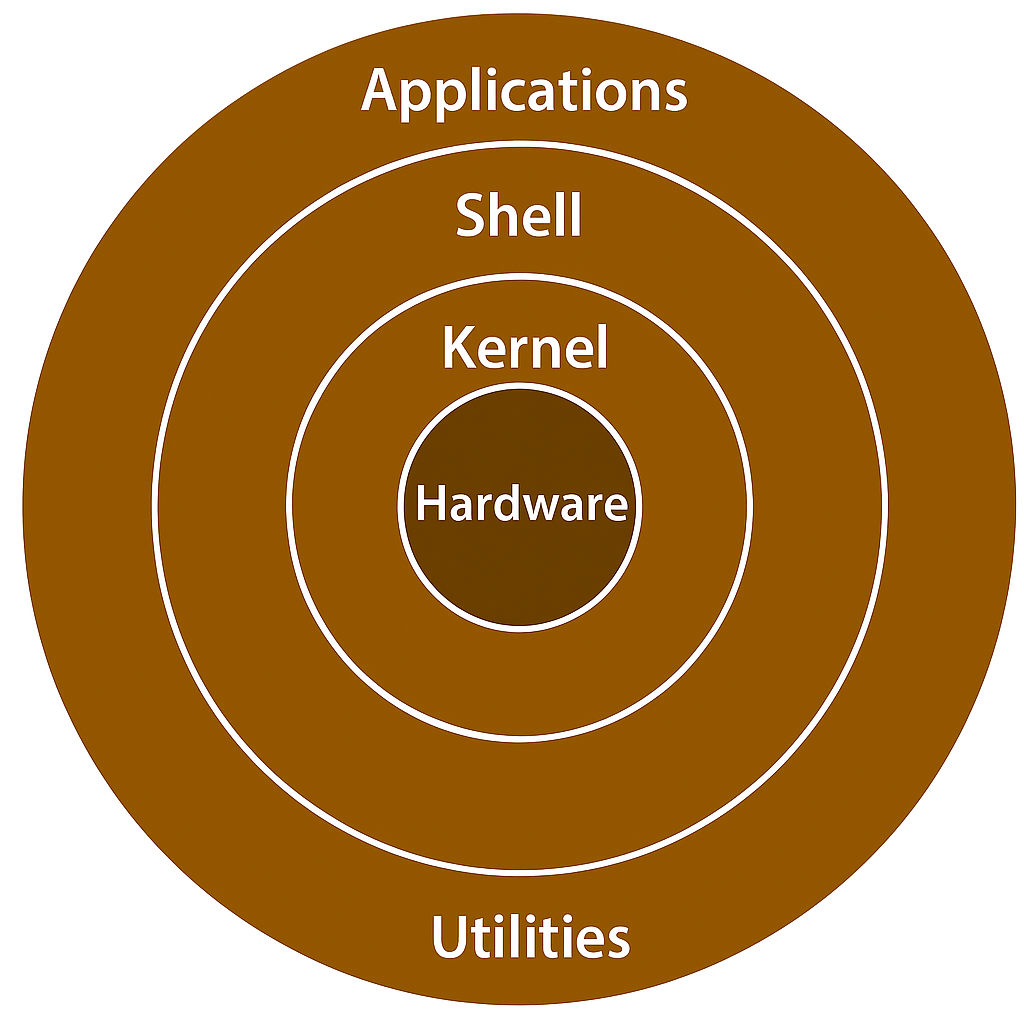
The Kernel#
- Kernel is also referred to as the supervisor, core, or internals of the operating system.
- Components of a kernel:
- Interrupt handlers to interrupt requests.
- Scheduler to share processor time among multiple processors.
- Memory management system to manage process address spaces.
- System services to manage interprocess communication, networking and much more.
- Kernel lives in an elevated system state compared to normal applications, aka kernel-space. Conversely, user applications execute in user-space.
- So, How do the applications in user-space communicate with the kernel? via system calls. An application usually calls functions in the C library(or any other library) that in turn rely on the system call interface to instruct the kernel to carry out the tasks on application’s behalf.
- Interrupts:
- It also manages the system’s hardware. When hardware wants to communicate with the system, it issues something called the interrupt, which literally interrupts the processor, which in turn interrupts the kernel.
- Every interrupt is identified by a unique number, and the kernel uses this number to execute the appropriate interrupt handler to service the interrupt.
- Example: As you type, the keyboard microcontroller issues an interrupt to let the system know that there is new data in the buffer. The Kernel notes the interrupt and executes the interrupt handler. Interrupt handler processes the data and lets the microcontroller know it is ready for more data.
- For synchronization, kernel can disable interrupts - all or some.
- In many Operating Systems the interrupt handlers run in a special interrupt context that is not associated with any process. This special context exists only to let an interrupt handler quickly respond to the interrupt, and exit.
- Each processor is doing one of the three things at any given moment:
- In user-space, executing user application code.
- In kernel-space, in process context, executing on behalf of a specific process.
- In kernel-space, in interrupt context, not associated with a process, handling an interrupt.
- When idle, the kernel is executing an idle process in process context in the kernel.
Monolithic vs Microkernel Designs#
- These are the 2 main types of kernel designs. There is another type, exokernel, which is mostly used for research systems.
- Monolithic kernels:
- Simpler design. Implemented entirely as a single process running in a single address space. Consequently, such kernels exist on disk as single static binaries.
- All kernel services exist and execute in the large kernel address space.
- Communication is easy because everything runs in kernel mode in the same address space. So, simple function calls are sufficient.
- Most Unix systems are based on this design.
- Microkernels:
- Functionality broken down into separate processes, called servers.
- Ideally, only the servers absolutely requiring such capabilities run in a privileged execution mode. The rest of the servers run in user-space.
- All servers are separated into their own address spaces and need to communicate via message passing.
- An interprocess communication(IPC) mechanism is built into the microkernel to facilitate communication between the servers(message passing) and invoke their services.
- Message passing in microkernels incurs higher latency and lower throughput due to context switches, so modern microkernel systems run most servers in kernel-space to reduce overhead and allow direct function calls.
- Examples: Windows NT(on which windows XP, Vista, 7 are based), and Mach(which is the basis for macOS and iOS) are microkernel based designs.
Linux Kernel Design#
- Linux is a monolithic kernel, but it borrows some ideas from microkernel designs, like modularity, while executing everything in kernel-space.
- Linux kernel is modular, that is, it supports loadable kernel modules, which can be loaded and unloaded at runtime.
- Linux supports preemptive multitasking, that is, the kernel can preempt a running
process in order to schedule another process.
NOTE: The capability to preempt the kernel itself is called kernel preemption, which is different from preemptive multitasking.
- Linux does not have performance-sapping features from the microkernel designs, like message passing between servers.
- Linux is modular, threaded, and the kernel itself is schedulable.
Linux vs UNIX Kernels#
- Unix systems typically require a system with a paged memory-management unit(MMU), which translates virtual addresses to physical addresses and enforces memory protection. Linux historically has required an MMU, but special versions can run without one. This is a neat feature, as it allows Linux to run on very small MMU-less embedded systems.
- Linux supports dynamic loading and unloading of kernel modules, whereas many UNIX systems did not support this feature.
- Linux has Symmetric multiprocessor(SMP) support. Nowadays, almost all UNIX systems support SMP, but it was not always the case.
- Linux kernel is preemptive, whereas many UNIX systems were not.
- Linux’s approach for thread support: It views threads and normal processes as the same thing, whereas many UNIX systems have a separate implementation for threads.
- Linux provides an object-oriented device model with device classes, hot-pluggable
events, and a user-space device filesystem called
sysfs. Many UNIX systems do not have such a model. - Linux ignores some common Unix features, such as STREAMS, or standards that are impossible to implement efficiently.
- Linux is free and open source, whereas many UNIX systems are proprietary.
References#
- Linux Kernel Development (3rd edition) by Robert Love.